
Problem
A bank-detail change can redirect a later payment if the wrong account is accepted. A finance team needs to distinguish a requested bank-detail change from an approved account. When that distinction lives in messages, the person maintaining the vendor record may not have the decision in front of them.
The workflow needs a clear requester, a designated approver, and a decision attached to the change. Approval controls support the process; they do not replace independent checks on the request.
What we built
- Routed proposed bank-detail changes to designated approvers.
- Recorded approval decisions against the change.
- Kept unapproved bank details from becoming active.
When this workflow fits
This workflow fits finance teams using Business Central that need a recorded decision before changed vendor bank details become active. Review the current controls first: if they already enforce the required gate and retain the decision, a new extension may add little. This workflow does not validate bank-account ownership or replace the finance team’s independent verification of a request.
How it runs
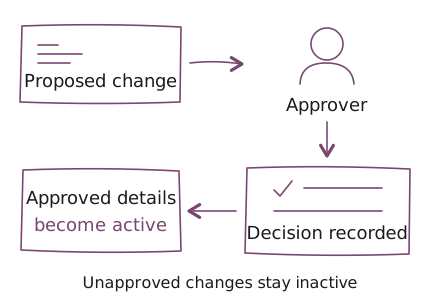
- The vendor-record administrator prepares the proposed bank-detail change.
- The workflow routes that change to its designated approver. A submitted request is not an approved account.
- The finance approver reviews the request and records the decision against the change. Finance must define the independent verification needed to make that decision.
- The workflow activates approved details and keeps unapproved details inactive. The gate is activation of the proposed bank details, not a guarantee about the legitimacy of a later payment.
For a new implementation, define what happens if details change again after approval. Test the exact values that may become active, along with rejection and resubmission. Do not assume an approval covers later edits.
Who uses it
Vendor-record administrators prepare changes. Finance approvers decide whether they may proceed. The finance process owner defines authority and exception handling.
When the normal path cannot finish
Before building, finance must name the person who handles an absent approver, a disputed request, or an urgent change. Agree whether a request waits, goes to an authorized substitute, or is rejected and resubmitted. An urgent payment is not approval of new bank details.
Define how an exception is authorized and recorded, who can see it, and whether a new approval is required. Confirm the required exception behavior during scoping; availability depends on the implementation.
Technology and integrations
Business Central supports the delivered approval workflow. Explore UCS Microsoft application delivery for related development and integration work.
Engagement fit
Product engineering fits a defined application or integration outcome. Agree on the first useful release, acceptance criteria, and who will operate it.
Scope this work with product engineeringWhat to agree before building
- Define who may request and approve changes, including how conflicting roles are handled.
- Agree on the checks required before approval, exception handling, and evidence retention.
- Map which legal entity owns each vendor record and which approvers have authority for it. Agree on substitutes and escalation contacts.
- Review existing extensions, imports, APIs, and payment processes before deciding the integration boundary. Test every in-scope way of changing bank details; do not assume a screen-level check covers other entry points.
- Define acceptance cases for approval, rejection, absence, resubmission, and edits after approval. Name who accepts the workflow and who maintains permissions after launch.
- Agree on commissioned-code ownership, extension licenses, access, and maintenance responsibilities. Review our delivery practices before sharing configuration or granting access.
Questions before we start
Does this prevent payment fraud?
The vendor bank account approval workflow does not guarantee fraud prevention. It controls when bank details become active. The finance team must also verify requests and define how it handles exceptions.
Can a requested account become active before approval?
The delivered Business Central vendor bank account workflow keeps unapproved bank details inactive. A new implementation needs agreed rules for existing accounts, rejected requests, and exceptional changes.
Can we use our current approval roles?
Existing vendor-approval roles can be the starting point, subject to a permissions review. Who requests, who approves, and how absences are handled must be agreed before implementation.
What happens when the approver is unavailable?
A vendor bank account approval process needs an agreed absence and exception path. Finance must decide whether the request waits, goes to an authorized substitute, or is rejected and resubmitted, and how the decision is recorded. Urgency alone does not approve a bank-detail change.
What should we bring to scoping?
To scope vendor bank account approvals, bring the current change process, approval roles, exception examples, and the relevant application configuration. Use sanitized examples without real bank details for the initial discussion.
Related
- Incident reporting and service operations on Power Platform
- Power BI usage and subscription reporting
Discuss your workflow
Bring the current change process, approval roles by entity, exception examples, Business Central configuration, and the extensions or payment systems involved. Use sanitized examples without real bank details. Identify the finance owner who can agree on the activation gate and accept the result.