

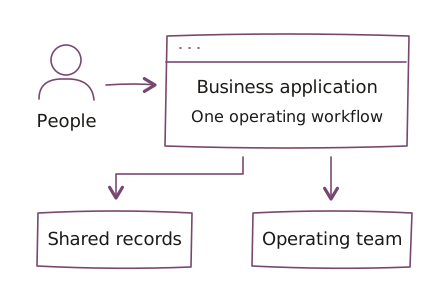
Start with the work people need to do, then connect its records and responsibilities.
The stack and its role
Our Microsoft delivery history includes customer relationship management and enterprise resource planning work with Dynamics 365, including Dynamics 365 Business Central for finance and operations.
We use Power Platform for business applications, workflow automation, reporting, and portals: Power Apps, Power Automate, Power BI, and Power Pages. Azure can support hosting and integration around these applications where the system requires it.
Applications we have delivered
Our delivery includes the applications below. Use them to discuss a similar workflow with us. Functions, integrations, access rules, and support responsibilities depend on the implementation. These examples describe delivered scope, not guaranteed results.
Vendor bank-account approvals
Operating problem: Finance needs to know who requested a change to vendor bank details and who approved it before payments use the new account.
Workflows:
- Route bank-detail changes to designated approvers.
- Record approval decisions.
- Keep unapproved details from becoming active.
Delivery context: A Business Central approval workflow. Approval rules and permissions need to match the organization’s financial controls.
Explore vendor bank-account approvals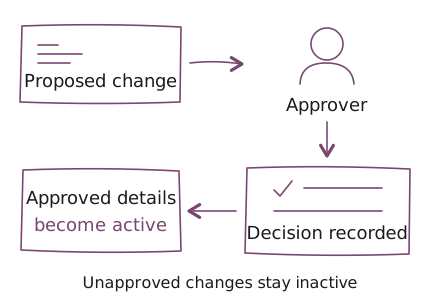
Incident and service operations
Operating problem: Incidents spread across messages and spreadsheets make responsibility and resolution difficult to track.
Workflows:
- Maintain incident records in a shared workflow.
- Assign responsibility for handling an incident.
- Track resolution.
Delivery context: A Power Platform application for operations teams. Agree on escalation rules, review of unresolved work, and support coverage for the engagement.
Explore incident and service operations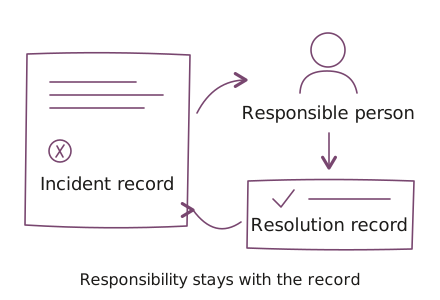
User analytics and reporting
Operating problem: Teams need to understand changes in product activity and subscriptions when reviewing usage.
Reporting views:
- Review daily and monthly active users.
- Compare free and paid plans.
- Review subscription status.
- Follow trends over time.
Delivery context: Power BI user analytics reporting. Define data sources, metric meanings, refresh needs, and access boundaries before using the report to guide decisions.
Explore user analytics and reporting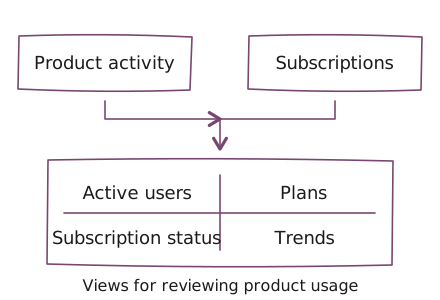
Also delivered
Our broader Microsoft work includes the following application types. Discuss the functions and integrations your team needs when scoping a similar application.
- Visitor management: visitor tracking with Power Apps.
- Asset management: asset records with Power Apps.
- Purchase requisitions: purchasing requests in Business Central.
- Payment reminders: automated payment reminders in Business Central.
- Business-rule validation: configured checks on operational records in Business Central.
When Microsoft fits
This ecosystem is worth considering when your workflow needs to connect with an existing Business Central or Dynamics 365 system, or when your team already works with Power Platform. Start with the application people use and the decisions they need to make.
For custom APIs and application services around these systems, explore our .NET development services.
Before choosing an implementation, review:
- Existing systems: the records the workflow reads or changes, and the integrations it depends on.
- Access and exceptions: who can request, approve, or correct a change, and what happens when the normal path stops.
- Licensing and operation: the licenses, environments, maintenance, and support the application will need.
When another approach fits better
A Microsoft implementation is a poor starting point if the only reason is a vendor preference and the workflow already works in another system. Compare a configuration change or a bounded integration before commissioning a new application. If you need an independent product rather than a workflow around existing business records, start with product engineering and compare the application requirements.
Do not assume the existing licenses, environment access, or connectors cover the proposed workflow. Your system owner needs to confirm the permitted access and operating constraints before implementation. An approval application also cannot replace the finance team’s decision rules or verification responsibilities.
Agree on the operating scope
Start with one workflow, its exceptions, and the systems it touches. Identify who accepts the implementation and who maintains it after release. Use product engineering for application delivery or forward-deployed engineering when the work needs an embedded team close to users.
Questions before we start
When does Microsoft application delivery fit?
Microsoft application delivery fits workflows that connect existing Business Central, Dynamics 365, or Power Platform use. Confirm record access, exceptions, licenses, and an operating owner. An existing configuration or smaller integration may be sufficient; a vendor preference alone is not a reason to rebuild.
Are licenses and integrations included automatically?
Microsoft application licenses, environments, and integrations must be reviewed for the proposed scope. Existing access does not establish permission or technical coverage for every connector, record, or deployment. Agree on the required systems and maintenance responsibility before implementation.
Do the delivered applications guarantee business results?
The Microsoft application examples describe delivered scope, including approvals, incident records, and usage reporting. They do not guarantee fraud prevention, incident response times, or retention improvements. Each implementation needs its own rules, acceptance checks, and operating agreement.
Who owns the workflow after release?
A Microsoft workflow needs a business owner for rules and exceptions and an agreed technical owner for access, integrations, and application maintenance. Decide who accepts releases and who handles failures. Ongoing support coverage is separately scoped.
Bring a workflow and its system boundaries
Bring the business process, current applications, relevant license and environment information, and sanitized examples of normal and exceptional requests. Include the process decision owner and the system administrator who can approve access. Do not send credentials, bank details, customer records, or confidential tenant exports.