

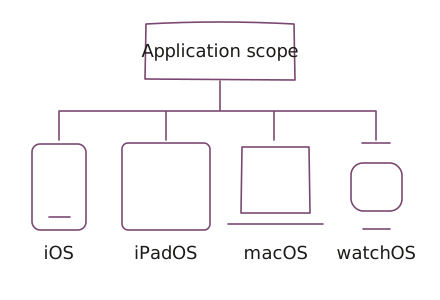
Device coverage follows the application
Our Apple delivery spans iPadOS and watchOS, as well as iOS and macOS. Device coverage varies by application.
Our calling-product work spans iOS and macOS. Our business applications and signing work also include Flutter implementations for mobile use.
The application determines which devices and workflows need support. A shared implementation does not remove the need to check permissions, system integrations, usability, and release behavior on each supported platform.
Applications built in practice
Device and feature coverage vary by application.
Invoicing and financial records
Operating problem: Businesses need to keep invoices, line items, and payment records organized as work changes.
Delivered work: UCS built mobile invoicing workflows, including invoice, item, and payment-record synchronization.
Delivery context: The work includes iOS and Android implementations. These workflows synchronize payment records. Payment processing must be scoped separately.
Discuss invoicing workflows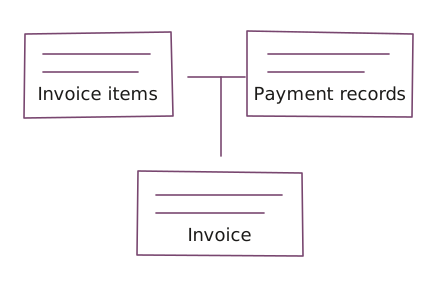
Applications built around client work
Operating problem: Teams need to organize delivery, manage client relationships, and get documents signed without losing track of the work.
Delivered work: Project workflows include task planning, time capture, and work reports. Client workflows include deal stages and follow-ups. Document signing is a distinct application within the broader suite.
Platform context: Embedded product engineering included Flutter mobile application work. The applications share account access; workflows between applications require separate integration.
See the business applications project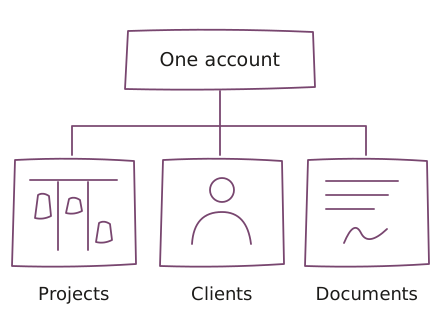
Voice recording and document tools
Our voice-recording work includes capturing and managing audio, with editing workflows defined by the application. Document signing work includes preparation, multiple signers, status tracking, and reminders.
These are separate tools with their own workflows. Supported devices and document capabilities vary by application.
Discuss audio and document workflowsMore application work
Our delivery also includes the following types of applications. Features and platform coverage vary by product; these categories are not a standard package of functions.
- Transportation: passenger and driver applications for iOS and Android.
- Learning and puzzle games: learning activities and physics-based drawing puzzles, with development, adaptation, and testing scoped by title.
- Calling and messaging: separate phone numbers, calls, messages, and voicemail.
- Cybersecurity applications: VPN connection workflows, testing, and ongoing application maintenance.
- Photo and video creation and editing applications: slideshow creation, media editing workflows, and video export.
- Drawing and creative tools: mobile drawing applications.
When Apple application delivery fits
Choose this scope when users need supported Apple devices and the workflow depends on their interface or device capabilities. Confirm the devices, required system integrations, distribution access, and the person who accepts the release before choosing the implementation.
If the workflow works well in a browser and does not need device-specific behavior, assess a web application first. For shared mobile workflows, compare Flutter and React Native; for native iOS behavior, consider Swift / iOS. Do not infer support for every Apple device from one mobile release.
The product owner decides supported workflows and devices. The technical owner and UCS agree on implementation, failure checks, and release responsibilities. Distribution and post-release care need an explicit owner; building an application does not guarantee acceptance by a distribution service.
Plan for the platform and the release
For native mobile interfaces and device integration, explore iOS app development with Swift. For mobile applications that share code across platforms, compare Flutter and React Native app development.
Agree on supported devices, account access, permissions, file handling, and the behavior people need when a connection fails. Include device testing, distribution, and post-release support in the plan. Desktop support should be an explicit decision for each application.
Use product engineering to carry an application from workflow definition through release. Choose forward-deployed engineering when implementation needs an embedded team close to users. Plan managed support around the released system.
Questions before we start
Does an Apple application automatically support every Apple device?
An Apple application does not automatically support every Apple device. iOS, iPadOS, macOS, and watchOS coverage depends on the application. Agree on target devices, required integrations, test coverage, and distribution responsibilities before implementation.
Should we choose native iOS or shared mobile code?
Native iOS development fits workflows driven by iOS interfaces and device capabilities. Flutter or React Native may fit shared mobile workflows, subject to integration and device checks. A browser application may be sufficient when device-specific behavior is unnecessary.
What is needed before an Apple application release?
An Apple application release needs agreed device coverage, permitted account access, acceptance checks, and a distribution owner. Review permissions, file handling, and failed connections on supported devices. Implementation does not guarantee distribution approval.
Who maintains the Apple application after release?
Apple application maintenance needs named owners for dependency updates, device and operating-system checks, failures, and distribution changes. Agree on those responsibilities and any managed support coverage separately from the initial build.
Bring the application and release requirements
Bring the user workflow, target devices, required device features, existing service boundaries, and distribution constraints. Include the product decision owner and the person responsible for release access. Share sanitized screens or workflow examples; do not send credentials, signing keys, confidential source dumps, or user records.